- Files in Linux
Files
There are two basic concepts in Unix – processes and files. The processes do things and files keep all the important data. An efficient filesystem is important for an operating system. When Unix was conceived around 1969-70, several design decisions were taken to simplify the filesystem. It was thought that if something was simple it ...
- Connecting 7" touchscreen display to Raspberry Pi 4B
1.0 Introduction
Raspberry Pi 4B has a Display Serial Interface (DSI) port for connecting a Raspberry Pi touchscreen display using a ribbon cable. In this post we will look at the process of connecting the Raspberry Pi 7″ touchscreen display with the Raspberry Pi 4B single board computer.
2.0 7″ touchscreen display
The Raspberry Pi 7″ ...
- Uname command with examples
1. uname command
The uname command prints information about the system. uname is a portmanteau word made up from “unix” and “name”. uname can be called from the command line in Linux as,
uname ...
The most common way to use uname ...
- Getting started with Raspberry Pi
1.0 Raspberry Pi
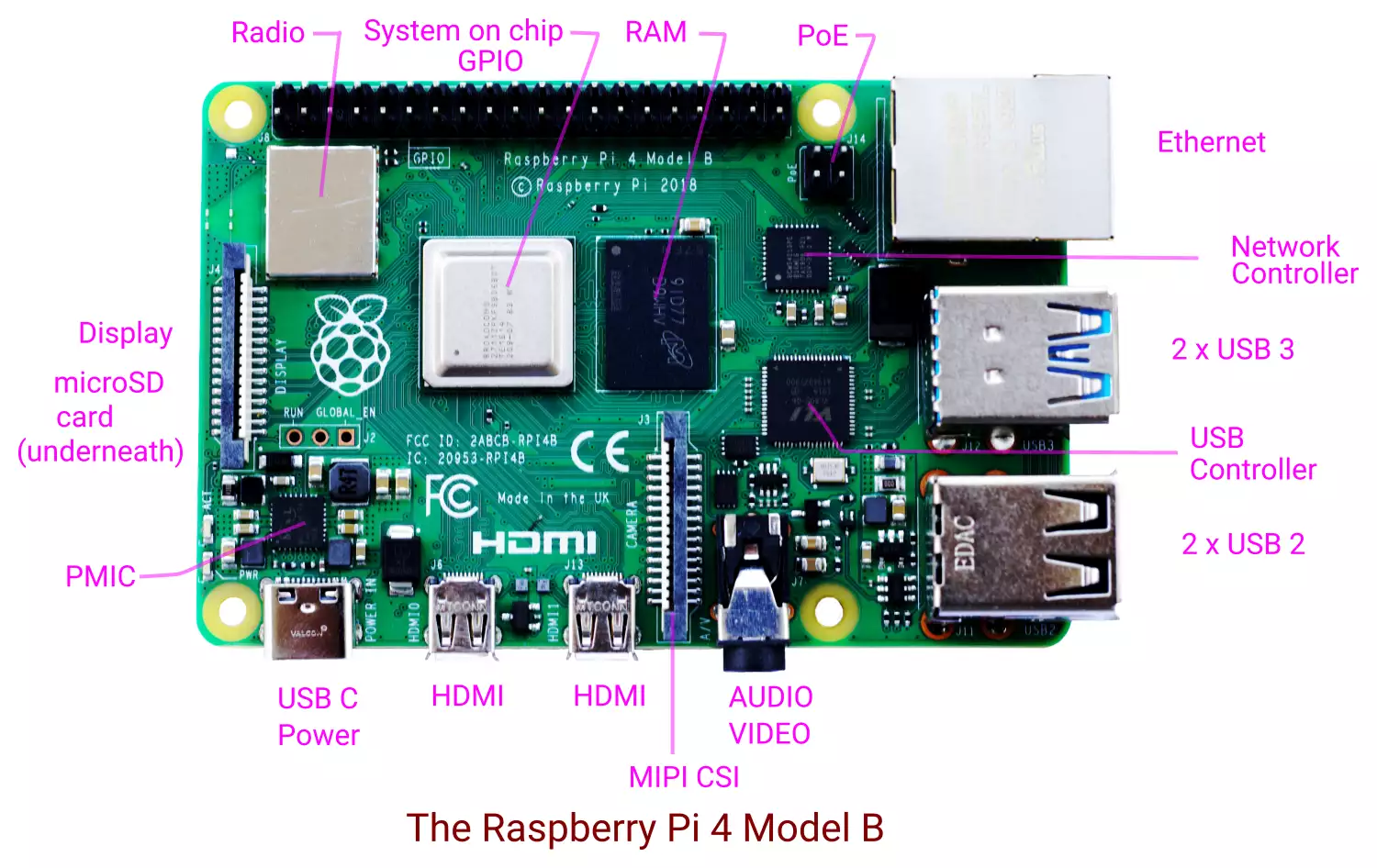
Raspberry Pi is a popular single board computer developed by the Raspberry Pi Foundation in the U.K. Raspberry Pi 4 Model B (Pi4B) was ...
- systemd – System and service manager in Linux
systemd is the system and service manager under the Linux operating system. It is an init system for managing user processes. It also provides various daemons for device management, user login management, network connection management, event logging, network time synchronization, name resolution, etc.
Table of Contents
- Syslog
Syslog
Syslog is a protocol for conveying event notification messages.
Syslog was first developed by Eric Allman for logging as a part of the Sendmail project in the 1980s. It soon became a de-facto standard for logging on Unix-like systems. Syslog was formally specified in RFC 3164 in 2001 as “The BSD syslog Protocol” ...
- Find user login history – last and lastb commands in Linux

1.0 last and lastb
The last command gives a chronological list of user logins in a Linux system for a period of time. The lastb commands gives a similar list of failed logins ...
- tmpfs in Linux

1.0 tmpfs
tmpfs is a filesystem that resides in the main memory of a Linux system. tmpfs stands for temporary file system. In the case of disk files, a file is first fetched into the kernel pagecache and the delivered to the ...
- Cut command in Linux
1.0 cut

The cut command cuts sections of each line of input files and writes it on its standard output. It is mostly used for taking out a few columns from the input files. The command ...
- tr command in Linux
1.0 tr
The tr command is a filter which reads the standard input, translates or deletes characters and writes on its standard output. The tr command syntax is,
tr
tr transliterates characters from SET1 into corresponding characters of SET2 in input and writes ...
- comm command in Linux
1.0 comm
The comm command compares two sorted files and gives output in three columns. The first column has lines which are present only in the first file. The second column contains lines which are present only in the second file. The third column gives the lines which are common to both files. ...
- uniq command in Linux
1.0 uniq
The uniq command is a filter for finding unique lines in input. It reads input, suppresses duplicates and prints unique lines in its output. Used with the -D option, we can do the inverse and print the duplicate lines only. The input must be sorted ...
- sort command in Linux
1.0 Sort
The sort command is for sorting lines in text files. For example, if we have a file names, we can sort it with the sort command,
$ cat names
John Doe
Jane Doe
John Roe
Richard Roe
Tommy Atkins
Max Mustermann
Erika Mustermann
Joe Bloggs
$
$ sort names
Erika Mustermann
Jane Doe
Joe Bloggs
John Doe
John Roe
Max Mustermann
Richard Roe
Tommy Atkins
The words in ...
- awk Tutorial
awk is a filter which takes the input and gives output after matching desired patterns and doing processing linked to matched patterns. awk is well suited for processing voluminous raw text data and producing statistical reports from it.
1.0 awk
awk is ...
- sed command in Linux
1.0 sed
sed is a stream editor that accepts a list of commands and input file names. It applies the commands one by one on each line of input and writes the resulting lines on the standard output. The commands are separated by newlines.
2.0 sed Command ...